Why Is Solar Generator Charging So Slowly? 9 Common Causes and Fixes
A solar generator can take much longer to charge than expected, even when it is connected to solar panels or a wall outlet. This can be frustrating when you need backup power for your home, RV, camping trip, or essential electronics.
Slow charging does not always mean the battery is damaged. The problem may come from weak sunlight, unsuitable solar panels, incorrect connections, high temperatures, or a charging limit built into the power station.
First, determine whether you are charging the unit with solar panels, a wall outlet, or a car outlet. Solar charging, wall charging, and car charging have different limitations, so the right solution depends on your setup.
In this guide, you will learn why your solar generator may be charging slowly, how to check the cause, and which changes can help improve charging performance.
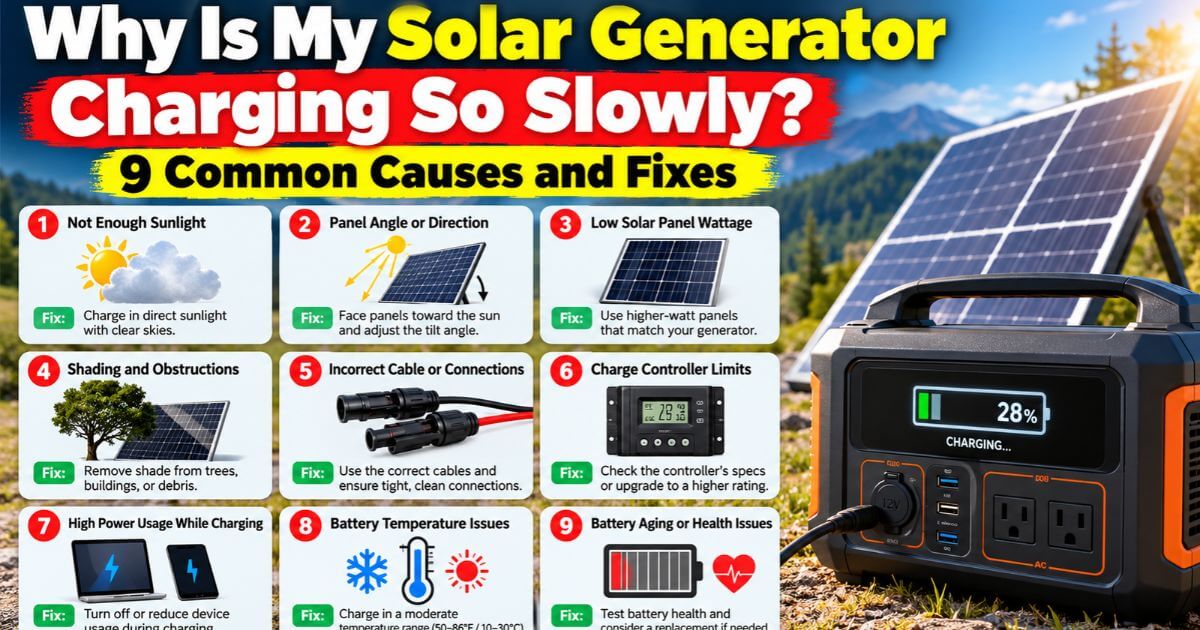
1. Your Solar Panels Are Not Receiving Enough Sunlight
Insufficient sunlight is one of the most common reasons a solar generator charges slowly.
Solar panel output changes during the day. Panels usually generate more electricity in strong, direct sunlight and less when clouds, shadows, or low sunlight reduce the energy they receive. Even partial shading can lower power production, depending on the panel design and how the panels are connected.
Dust, leaves, and other debris can also block sunlight from reaching the cells.
How to fix it
Set up your solar panels in an unshaded spot where they can receive plenty of direct sunlight. Adjust their angle as the sun moves, if practical, and keep them clean according to the manufacturer’s instructions.
Check for shadows from trees, buildings, vehicles, or nearby objects. If the power station displays solar input in watts, observe the reading when you move the panels into better sunlight.
Remember that the wattage printed on a solar panel is its rated output under specified test conditions. Real-world output is often lower because sunlight, panel temperature, angle, and other conditions vary.
2. Your Solar Panels Produce Less Power Than You Expect
A solar generator may support a high charging rate, but that does not mean every connected panel setup can deliver enough power to reach it.
For example, a power station that accepts up to 400 watts of solar input cannot receive 400 watts from a single 100-watt panel. Even a 400-watt array may produce less than its rated power under ordinary outdoor conditions.
The actual charging rate also depends on the power station’s maximum solar input and the voltage and current limits of its solar charging port.
How to fix it
Check the specifications for both your solar panels and power station before purchasing additional equipment.
Look for the following information:
- Panel rated wattage: The maximum rated output of the panel or array.
- Maximum solar input: The highest solar charging power the power station can accept.
- Input voltage range: The permitted voltage range for solar charging.
- Maximum input current: The highest current the charging port supports.
If your power station supports more solar power than your current panels can provide, adding compatible panels may improve charging speed.
However, adding panels will not help if the power station is already receiving its maximum permitted input.
3. Your Solar Panel Connections Are Incorrect or Loose
A loose connector, damaged cable, or unsuitable adapter can interrupt charging or reduce the power reaching your solar generator.
Some setups also use cables that are too long or too small for the current they carry, which can increase electrical losses. Incorrect wiring can cause additional problems or damage equipment.
How to fix it
Turn off or disconnect the equipment according to the manufacturer’s instructions before inspecting the connections.
Check that all plugs are fully seated and that the cables and connectors show no visible damage. Make sure you are using compatible connectors and the correct cable for your equipment.
If the power station does not detect the panels, check whether the panel voltage falls within the unit’s permitted input range.
Do not connect solar panels in series or parallel without checking the resulting voltage and current. The combined output must remain within the power station’s limits.
4. Cloudy Weather and High Panel Temperatures Are Reducing Output
Weather conditions can make a substantial difference to solar charging performance.
Thick clouds reduce the sunlight available to the panels. High panel temperatures can also lower their electrical output, even on a bright day. Therefore, hot weather does not automatically mean your panels will produce their maximum rated power.
How to fix it
Whenever possible, place the panels where they receive direct sunlight without unnecessary shading. Allow air to circulate around them, and follow the manufacturer’s guidance for installation and operating temperature.
If the weather is cloudy, charging may take longer despite correct connections and properly functioning equipment. There may be no fault to repair.
For more predictable charging, consider whether wall charging or another manufacturer-approved charging method is practical when solar conditions are poor.
5. Your Power Station Has Reached Its Maximum Solar Input
A solar generator has a limit on how much power it can accept from solar panels.
Suppose your power station supports a maximum solar input of 300 watts, but your compatible solar array could produce 450 watts under ideal conditions. The unit will generally limit the accepted input to its own rated maximum.
In that situation, increasing the panel capacity beyond the supported limit will not necessarily make the battery charge faster. Also read our blog on Why Your Solar Generator Won’t Charge.
How to fix it
Check the manufacturer’s specifications and compare the stated maximum solar input with the wattage shown on the display.
If the unit is already accepting power close to its limit, adding more panels may offer little or no improvement in charging speed.
If the measured input is much lower than expected, investigate sunlight, panel condition, connections, and input voltage before assuming that the power station is faulty.
6. Your Solar Generator Is Being Used While Charging
Some power stations can charge their batteries while supplying electricity to connected devices. However, the devices still consume energy while charging takes place.
For example, if the solar panels provide 150 watts and the connected devices consume 80 watts, only part of the incoming power remains available to increase the battery’s stored energy. Actual results also depend on conversion losses and the unit’s internal power consumption.
If the connected load approaches the incoming charging power, the battery percentage may increase very slowly or remain almost unchanged.
How to fix it
Disconnect devices that do not need to run while the battery is charging. Pay particular attention to high-consumption appliances such as refrigerators, electric heaters, and other equipment with substantial power demands.
Watch the solar input and output readings on the display, if available. Comparing these figures can help you determine whether connected devices are using most of the incoming energy.
If your goal is to recharge the battery as quickly as possible, charging with fewer connected loads is often a useful first step.
7. The Battery Is Nearly Full
Charging speed is not always constant throughout the battery’s charging cycle.
Many battery management systems reduce charging power as the battery approaches full capacity. This helps manage the final stage of charging and protect the battery within its designed operating limits.
As a result, a power station may charge quickly at a lower battery percentage but slow down significantly near 90% or 100%.
How to fix it
Check whether charging is slow only when the battery is nearly full or throughout the entire charging process.
If the charging rate decreases near full capacity, it may be normal behavior rather than a fault. Allow the unit to finish charging according to its instructions.
If charging becomes unusually slow even at a low battery percentage, investigate other possible causes, including input power, temperature, and charging settings.
8. The Battery Is Too Hot or Too Cold
Battery temperature can affect how quickly a power station accepts a charge.
Depending on the battery chemistry and the manufacturer’s design, charging may be reduced or stopped when the battery is outside its permitted temperature range. Cold conditions can be particularly important for lithium iron phosphate (LiFePO4) batteries, which generally must not be charged below their specified minimum temperature unless the unit has an appropriate protective system.
High temperatures can also trigger charging limits.
How to fix it
Move the power station into a dry, ventilated location within its specified operating and charging temperature range. Keep it out of direct sunlight and away from heat sources.
If the battery is cold, allow it to return to an approved charging temperature before trying again. Do not use an external heater or other improvised method to warm it.
Check the manual for the exact temperature limits of your model. If the unit displays a temperature warning, follow the manufacturer’s instructions rather than attempting to bypass the protection.
9. Your Wall Charger or Car Charging Source Is Limited
Solar generators can often charge through a household AC outlet, a vehicle’s 12-volt outlet, or other supported power sources. These methods do not necessarily provide the same charging speed.
A vehicle outlet may supply much less power than a compatible wall charger. A power station may also have an adjustable AC charging rate, or its charging speed may be limited by the supplied adapter.
How to fix it
Check the rated input power for the charging method you are using. If the manufacturer provides a compatible higher-power charger, it may reduce charging time when used within the power station’s limits.
For AC charging, check whether the unit has a charging-speed setting and whether it is configured for a lower input rate.
For car charging, verify the vehicle outlet’s rating and the power station’s supported input specifications. Never assume that a USB port, vehicle outlet, or third-party adapter can provide the same power as the manufacturer’s wall charger.
Avoid using incompatible chargers or adapters to force a higher charging rate.
How Long Should a Solar Generator Take to Charge?
Charging time depends on battery capacity, incoming power, conversion losses, battery temperature, and charging behavior. The following examples provide a rough starting point for estimating solar charging time.
| Battery capacity | Average charging input | Idealized charging time |
| 500 Wh | 100 W | 5 hours |
| 1,000 Wh | 200 W | 5 hours |
| 1,500 Wh | 300 W | 5 hours |
| 2,000 Wh | 400 W | 5 hours |
These examples divide battery capacity in watt-hours by charging power in watts. They assume the stated input power remains constant and do not account for charging losses or changes in charging rate.
Actual solar charging can take considerably longer because panels rarely maintain their rated output throughout the day. A 1,000 Wh power station connected to a 200 W solar array will not necessarily receive 200 watts continuously.
For a more realistic estimate, use the average power actually entering the battery rather than relying only on the panel’s advertised wattage.
Solar Generator Charging Troubleshooting Checklist
If your power station is charging much more slowly than expected, work through these checks before buying new equipment.
| What to check | What to look for |
| Sunlight | Shade, clouds, or poor panel positioning |
| Solar input | Wattage lower than expected on the display |
| Connections | Loose plugs, damaged cables, or unsuitable adapters |
| Input limits | Panel voltage or current outside permitted limits |
| Connected devices | Output consumption using much of the incoming power |
| Battery level | Slower charging near full capacity |
| Temperature | Battery or equipment outside its allowed charging range |
| Charging settings | Reduced AC input or another active charging limit |
| Equipment condition | Persistent warnings or abnormal behavior |
If charging remains unusually slow after these checks, consult the manufacturer’s troubleshooting instructions or contact its support team. A damaged cable, faulty charger, defective panel, or battery problem may require professional diagnosis.
Should You Buy More Solar Panels to Charge Faster?
Not necessarily. Before spending money on additional panels, identify what is limiting your charging speed.
If your existing panels provide less power than the station can accept, a larger compatible array may help. If the station is already receiving its maximum supported solar input, additional panel capacity may not increase the charging rate.
If sunlight is weak, the cables are unsuitable, the battery is too hot or cold, or the unit is limiting input for protection, more panels may not solve the underlying problem.
Compare the maximum solar input, permitted voltage range, maximum current, and compatible panel configurations before making a purchase.
Final Verdict
A solar generator that charges slowly does not necessarily have a faulty battery. The cause may be as simple as cloudy weather, shaded panels, limited solar input, or devices consuming power while the battery is charging.
Start by checking the actual charging wattage, the battery’s temperature, and the power requirements of your setup. Then compare those readings with the manufacturer’s specifications.
If the equipment is compatible and the charging rate remains unexpectedly low under suitable conditions, investigate the cables, charger, panels, and battery according to the manufacturer’s troubleshooting guidance.
Understanding what limits your charging speed can help you get better performance from your existing equipment and avoid spending money on upgrades you may not need.
Frequently Asked Questions
Why is my solar generator charging at only a few watts?
Possible reasons include weak sunlight, shading, loose connections, temperature limits, a nearly full battery, or a charging input restriction. Check the display and inspect the setup according to the manufacturer’s instructions.
Do solar panels charge slower on cloudy days?
Yes. Cloud cover reduces the sunlight available to solar panels, so their output can fall significantly. The amount of reduction depends on the cloud cover, panel technology, and surrounding conditions.
Can I use a higher-wattage solar panel to charge faster?
Possibly, if the power station accepts the additional input and the panel configuration meets its voltage and current requirements. A panel with a higher wattage rating will not automatically deliver more power than the station can accept.
Is it bad to leave a solar generator charging all day?
Use the charging methods and operating conditions specified by the manufacturer. Many power stations include battery management and charging protection, but you should still follow the manual’s temperature, ventilation, and charging instructions.
Why does my solar generator charge quickly at first and then slow down?
Many power stations reduce charging power as the battery approaches full capacity. This can be normal charging behavior, especially near the end of the charging cycle.
How can I charge my solar generator faster without buying new panels?
Try improving panel placement, removing shade, cleaning the panels appropriately, checking the connections, reducing connected loads, and confirming that the charging settings and temperatures are within the recommended ranges.